Add your first skill
Skills are superpowers you install once.

Install this skill for me: https://github.com/sva-admin/last30days. Before you change anything, read it and tell me what it does and how I trigger it.
A skill (a folder of plain text instructions) is something Claude Code reads by itself when the moment calls for it. You install one, once. From then on Claude already knows how you want that job done, in every session, with nobody there to remind it.
Under the hood
Claude Code keeps a short list of the skills you have, with one line each about when to use them. Your words get matched against those lines before it starts writing an answer.
Why this matters
Every session starts from zero. You explain your writing style, your folder layout, and the way you want work checked. Tomorrow you explain all of it again. A skill is that explanation written down once, in a place Claude Code reads on its own. Teach it once, keep it forever.
- Monday: you type the rules.
- Tuesday: you type them again.
- Wednesday: you type them again.
- Monday: you write them once.
- Tuesday: the skill brings them.
- Wednesday: the skill brings them.
Before and after
The gap between these two blocks is one text file you can read.
- Claude loads your instructions on its own.
- You describe the task and the rules come with it.
- What worked once works every time after.
- You paste the same instructions every morning.
- Claude forgets how you like things done.
- A great session cannot be repeated on purpose.
Drag to compare
What you need
- Claude Code installed. If it is not yet, do the Install Claude Code lesson on loop.sv-academy.org first.
- Get the skill: https://github.com/sva-admin/claude-skills
- That is SV Academy's shelf of skills. Each one says where it came from and who wrote the original.
- About ten minutes
Figure 4 shows where a skill lands once you install it. One folder holds them all, and each skill is a folder inside it.
~/.claude/skills
├── last30days/
│   └── SKILL.md
└── carousel/
    └── SKILL.md
If Claude Code cannot find your new skill, it usually landed in the wrong folder. Say that out loud to Claude and ask it to move the folder here.
Steps
Know what you are installing
A skill is text, so read it before you run it. Open the repo (the folder GitHub keeps a project in) and click SKILL.md. Those are the instructions Claude Code will follow, top to bottom, and nothing is hidden underneath them.
last30days
├── SKILL.md
└── README.md
Get the link
Copy the link of the skill you want. Read the top of its page first: it says what the skill does, who wrote the original, and what SV Academy changed. Figure 6 is the shelf that every one of those links comes from.
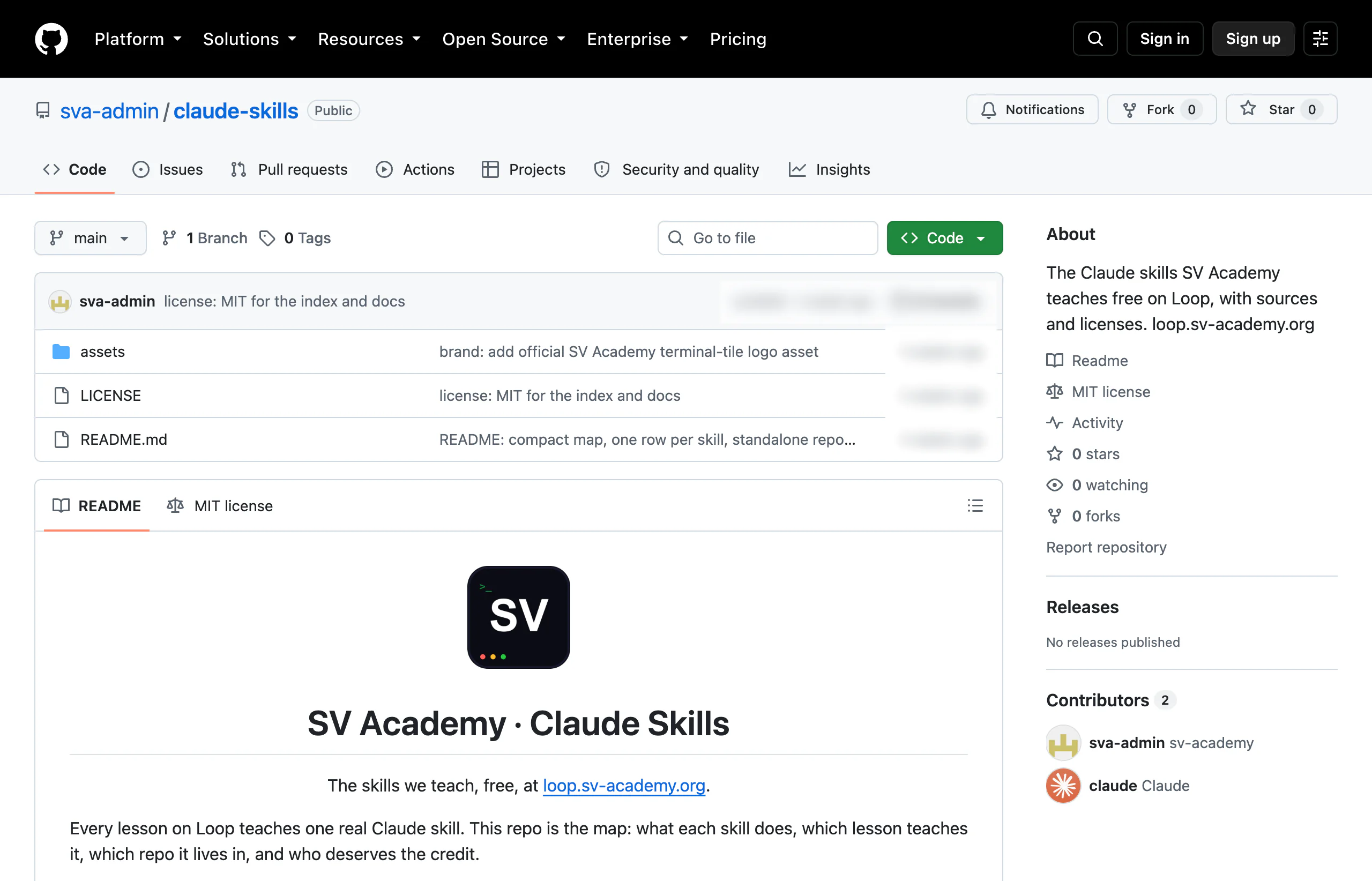 1234
1234- 1The sva-admin / claude-skills name at the top, which is the address of the shelf itself.
- 2README.md in the file list, the only file this repo needs.
- 3The loop.sv-academy.org link inside the README, which is where the lessons live.
- 4The green Code button, where the download lives if you ever want the files by hand.
One link on your clipboard, in this shape:
https://github.com/sva-admin/last30days
Handed a folder instead of a link? Use its path, meaning where that folder sits on your computer, anywhere the prompt says link.
Install this skill for me: [paste the link or the folder path]. Before you change anythin…
Ask Claude Code to explain it before installing it
Paste the prompt below into Claude Code. You get back a summary and a request for permission before one file is written, so read that summary properly.
Install this skill for me: [paste the link or the folder path]. Before you change anything, read it and tell me in plain language what it does, what it will write to my computer, and how I trigger it.
I read the skill first. In plain words, it ...

  It writes one folder to your computer:
  ~/.claude/skills/last30days/

  Create this folder?
  1. Yes
  2. No, and tell me what to do instead
The exact wording moves around between versions. What matters is that it asks you before it writes.
Anything you install here can write files on your computer, and a skill is only as safe as the person who wrote it. Read the summary, and answer no if it surprises you.
List the skills you have available right now. For each one, tell me in one line when you'…
Confirm it is really there
Ask for the list, then look for your new skill on it. If it is missing, say exactly that and ask Claude to sort it out. Usually the folder landed somewhere Claude Code does not look, and Claude can move it in one step.
List the skills you have available right now. For each one, tell me in one line when you'd use it.
Skills available right now:

  last30days   what people said about a topic, last 30 days
  carousel     turn a pile of notes into a carousel
  ...
Your list will be longer or shorter than this one. The only line that matters today is the one you added a minute ago.
[Describe the exact task the skill was built for, in your own words, without naming the s…
Trigger it without naming it
There are two ways to use a skill. You can name it, or you can describe your task normally and let Claude notice the match. The second way is the real test. Watch the first few lines of the reply, because Claude usually says which skill it reached for.
- You type: use the last30days skill on this.
- It loads because you told it to.
- You type: what did people say about this in the last month?
- It loads on its own, which is the test.
[Describe the exact task the skill was built for, in your own words, without naming the skill.]
One skill sitting in ~/.claude/skills/, a plain summary of what it does, and one reply that loaded it without you naming it.
If not: Ask Claude Code to list your skills again. If the new one is missing, tell it where the folder went and ask it to move the folder into ~/.claude/skills/.
Use cases
A skill becomes yours the moment you open it, because opening it is opening a text file. Pick the person below whose week looks most like yours.
- Changes three lines of writing rules.
- Every draft arrives in her voice.
- Adds the one check it missed.
- His order, on every client file.
- Sends the folder to two colleagues.
- Three classrooms, one worksheet format.
Editing a skill is editing a text file. That is the entire maintenance story, in this lesson and in every lesson after it.
Mint repeats the same rules constantly: no exclamation marks, short paragraphs, always one real example. She installs the skill, opens it, and edits three lines so the rules are hers. Now every draft arrives in her voice on the first attempt, and editing takes half the time.
Open the skill I installed, change the writing rules to match this sample of my work, and show me exactly which lines you changed. [paste a paragraph you wrote]
Anan checks every client file the same way: dates, totals, missing receipts, duplicate rows. He installs the skill, hands it one real file, and watches whether it follows his order. It skips one check, so he opens the folder and adds a line. That is the entire maintenance story.
Run the skill on this file and show me each check in the order you did it. Then tell me anything on my list you skipped.
Dao ends up with a skill that turns a lesson topic into a worksheet in her school's format. It works, so she sends the folder to two other teachers, who install it exactly as she did. Three classrooms now use the same format without anyone calling a meeting.
Explain how I'd share this skill with a colleague: what exactly I send them, and what they have to do to install it.
Try it
Pick one level. One finished attempt teaches you more than three skimmed ones.
- About five minutes.
- You end up holding an explanation.
- About ten minutes.
- You end up holding a verdict on it.
- About twenty minutes.
- You end up holding a skill of your own.
Read the skill I installed and explain it back to me line by line, like I'm the person who has to maintain it.
Run the skill on a small, low stakes example first. Then tell me what it handled well and where it was guessing.
I do this same thing every week: [describe your repetitive task]. Turn it into a skill of my own. Keep it short, and explain each instruction you wrote and why it's in there.
What's next
Once you have installed somebody else's skill, writing your own is a short step: a plain text file that says how you like a job done. The lesson worth doing next turns one of your own weekly routines into a skill Claude Code picks up without being told.
Paste the skill you found and tell us the job you want it to do.
Install this skill for me: [Skill link or name]. [Before it changes anything]. Then tell me in plain words what it does, what it writes to my computer, and the exact words I type to trigger it. After that, run it once on a small real job so I can see it work: [The job you want it to do]. Tell me what it handled well and where it was guessing.
Empty boxes copy as blanks. Claude will ask you to fill them.