Prom Design: ship pages that look expensive
A page that looks paid for, from one command

Install the skill from https://github.com/sva-admin/sv-academy-prom-design, then ask me your intake questions and name two or three directions before you rebuild my landing page for [your product].
People decide how they feel about a page in about 50 milliseconds, and they rarely change their mind. Left alone, most AI coding agents lose that half second the same way. A purple gradient, an emoji where a logo should be, and a promise with nothing behind it. Prom Design is a free skill: a folder of instructions your AI reads before it works. It hands your agent one proven house style before it builds. Prom is Thai for ready. Figure 1 is the swap it makes.
- A purple gradient behind everything
- An emoji standing in for a logo
- Big claims with nothing beside them
- A tinted ground, never pure white
- One serif headline, sized like a magazine
- A real number beside every claim
Why this matters
Nobody emails you to say the page looks cheap. Around three quarters of people decide whether to trust a business from how its site looks. Your page does that work before a single word is read. Figure 2 is what an agent builds for a beachfront condominium when nobody hands it a style. The brand is invented. The look is not.
 1234
1234- 1The purple gradient, the background almost every AI agent reaches for first.
- 2An emoji standing in where a logo should be, which tells a visitor nothing about the business.
- 3A promise with no evidence beside it: cutting edge, endless possibilities, nothing anybody can check.
- 4A rounded pill button reading Get Started, which never says what happens after you press it.
Your page is judged before it is read. That judgement comes from rules, and rules can be installed.
Before and after
Same invented brand, same one line request. One difference: the skill was on the machine for the second run.
- You ask for the same page with the skill installed.
- A photograph carries it, and one serif headline sits on top.
- Every claim has a measured number beside it.
- You ask for a landing page and get a purple gradient.
- An emoji sits where the logo belongs.
- Every claim is an adjective with no evidence.
Drag to compare
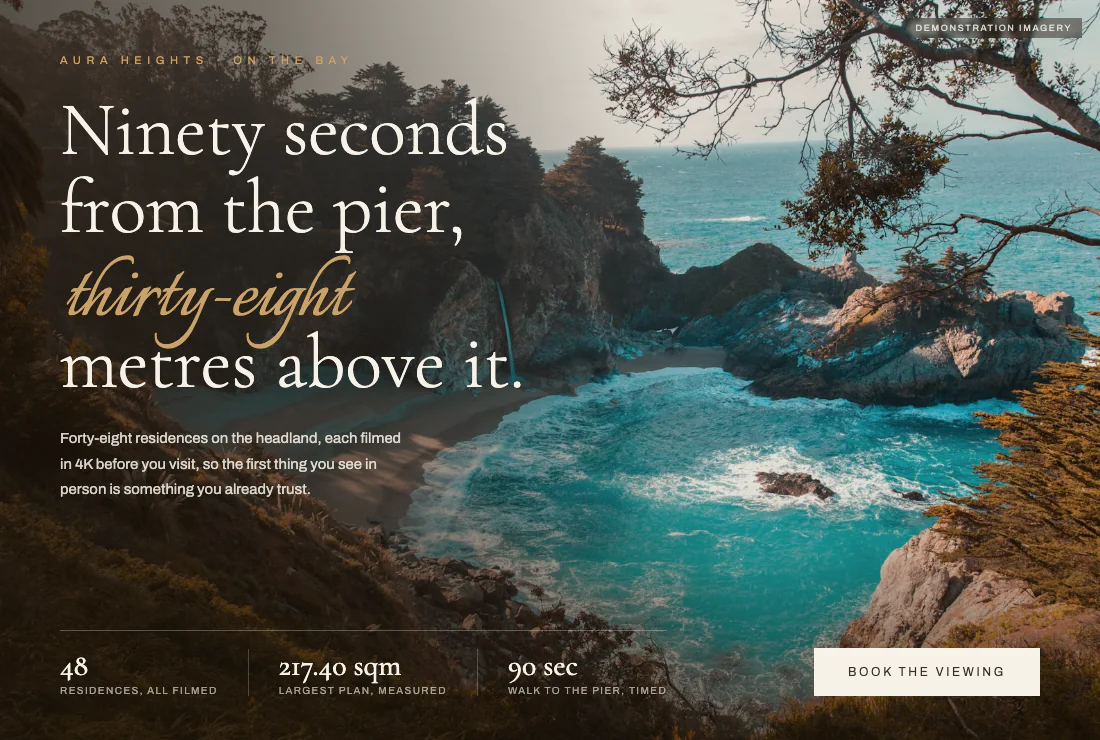
Figure 3 is that second run, and nothing about the brief changed.
 1234
1234- 1The serif headline, where the number thirty-eight is doing the selling instead of an adjective.
- 2The proof line under the headline: every residence filmed before you visit, which a visitor can go and check.
- 3Three measured facts along the bottom, each with the thing that was measured written underneath it.
- 4The stock photograph is labelled demonstration imagery, because the style never lets a picture imply something untrue.
What you need
Four things. Three of them are free.
- An AI coding agent: Claude Code at claude.com/claude-code, Cursor, or any of the nineteen or more the
skillstool knows. - Node on your computer, which makes the
npxcommand work. The Start here lessons install it. - The skill itself, free and open, at https://github.com/sva-admin/sv-academy-prom-design
- One page or product to point it at. One sentence is enough.
Every demo is a real page: open both halves of any before and after at https://sva-admin.github.io/sv-academy-prom-design
Figure 4 reads the install line for you, one piece at a time.
npx1 skills2 add3 sva-admin/sv-academy-prom-design4
- 1Borrows a tool once
- 2The skills installer
- 3The action
- 4The skill address
Steps
Install the skill
This puts the style on your machine for every project you open afterwards. Run it once, inside the folder your project lives in.
npx skills add sva-admin/sv-academy-prom-design
Repository cloned
Found 1 skill
Skill: prom-design
Installing to all agents
  ./.agents/skills/prom-design
  universal: Amp, Antigravity, Cline, Codex ...
Installation complete
The list of agents will read differently on your machine. The folder path and the last line are the parts that have to be there.
Do you have the prom-design skill? Answer in one line.
Check that it took
Ask before you build. If your agent cannot name the skill, the install did not land, and your page comes back generic.
Do you have the prom-design skill? Answer in one line.
Yes. prom-design is loaded: one house style, two registers, mobile first, with an audit at the end that rejects the generic look.
The wording will be its own on your machine. The word yes and the skill name are the parts that matter.
Use the prom-design skill. Build a one page site for my dive shop in Phuket. It should se…
Answer the sixty second intake
The skill asks three short questions before it writes anything. The second one decides the rest: should this page sell, or should it work? The skill calls those two answers registers. Then it names two or three looks for you, each with its real colours written out, and you pick the one you like instead of describing it. Figure 5 is the register choice in plain words.
- Landing pages, brands, portfolios
- One big photograph and a serif headline
- The visitor is deciding whether to care
- Booking flows, dashboards, accounts
- Dense cards, real numbers, a bar of tabs
- The visitor is trying to finish something
Use the prom-design skill. Build a one page site for my dive shop in Phuket. It should sell, not work. Ask me your intake questions first.
Three questions first.
1. What is this page for, and who lands on it?
2. Should it sell, or should it work?
3. Anything that must stay: colours, a logo, existing copy?
Then two directions, one of them recommended.
1. Deck teak (recommended): warm sand ground #F1E7D8, ink #2A2118, buoy orange accent #C2542B, Fraunces and Archivo. The boat's own wood and the marker buoys.
2. First light: cool grey blue ground #E8EDF0, lamp amber accent #C08A2E, Newsreader and Archivo. Moodier, better if the 06:40 departure is the story.
Pick one, mix them, or say build it and I will take the recommended one.
Your agent names its own directions and its own colours. What it must do is offer you a choice you can point at before it builds anything.
Pick one, mix two, or say build it and it builds. Six demo brands in the repo came from these same rules and no two of them share a palette.
Here are my real numbers: 48 residences, 217.40 sqm at the largest, 38 metres above the b…
Hand it your real numbers
Precision is the part that reads as expensive, and it is the one part your agent cannot invent for you. Vague words make a page that could belong to anybody. Figure 6 is the same three facts written both ways.
- Spacious residences
- Close to the water
- Great value for money
- 217.40 sqm, the largest plan
- Ninety seconds from the pier
- 48 residences, all of them filmed
Here are my real numbers: 48 residences, 217.40 sqm at the largest, 38 metres above the bay, ninety seconds from the pier. Put them in the page and never round them.
Headline: Ninety seconds from the pier, thirty-eight metres above it.
Proof strip: 48 residences, all filmed. 217.40 sqm, largest plan. 90 sec walk, timed.
No claim on the page without a number beside it.
If a number turns up that you did not give it, say so and ask where it came from. Invented numbers are the one thing this style must never do.
Run the prom-design review gate on this page at 375, 768 and 1280 pixels wide. Then run t…
Look at it on a phone before you believe it
Most of your visitors are on a phone, so the skill builds for the phone first: it lands the argument in about three and a half phone screens and never lets the page slide sideways. Your job is to check it held. A hero is the big first block at the top of a page, and one that breaks at 375 pixels looks broken to nearly all of them. The skill ships a review gate that shoots all three widths for you. Figure 7 is the order that keeps you out of trouble.
Run the prom-design review gate on this page at 375, 768 and 1280 pixels wide. Then run the audit and fix every failure you find.
Generated images and video cost real money. The skill prints the plan and the price and waits for your yes, so read that message before you answer it.
A page built in one named register, your own numbers on it, and screenshots at three widths that you have looked at yourself.
If not: No screenshots? Ask your agent to run the skill's shots script against your local address and show you the three image files.
Use cases
Every one of these starts with a fact the owner already had and never thought to put on the page. Figure 8 puts each fact beside what the skill did with it.
- Two boats, six sites, 06:40 departure
- Twelve tables, one seating a night
- 214 frames kept out of 41,800
- A headline you can set your alarm by
- A screen that counts the places left
- One photograph and a very small menu
Before you write a word of copy, list the numbers you already know. That list is most of the page.
She has two boats, six sites, and a 06:40 departure. Her page has a template that makes the trip look like every other trip. So she hands the skill her timetable instead of adjectives.
Use the prom-design skill. One page for my dive shop, a page that sells. Two boats, six sites, 06:40 departure, 18 metres maximum depth. Put the real numbers in the headline.
His events fill up and people still phone to ask whether there is room. He wants the page to answer that on its own, on a phone, before anybody picks up.
Rebuild our events page with the prom-design skill, a page that works. Follow the webapp playbook: density budget, a bottom bar of tabs, and places left counted from the database.
Her portfolio is a list of links, and her best project sits at the bottom of it. She wants one page that proves the work rather than describing it.
Use the prom-design skill on my portfolio. A page that sells, one full width image, a very small menu. Put the numbers next to every project instead of adjectives.
Try it
Three levels, and each one hands the skill a bigger mess to sort out. Figure 9 is the shape of the jump.
Use the prom-design skill. Build a one page site for a coffee roastery, a page that sells, with real copy and no placeholder text.
Apply the prom-design skill to this page. Keep my content and my brand colours, show me before and after, and name every rule you applied.
Rebuild my booking flow as a mobile web app using the prom-design webapp playbook, then run the audit and hand me the list of failures you fixed.
What's next
One page now looks right, and one page is where this lesson stops. The next lesson is the process behind it. Seven gates a studio runs on paid client work, from the brief nobody skips to the audit before a client sees anything.
Say what you are building and which facts you already have. The skill turns them into the page.
Use the prom-design skill. Build the page for [What you are building]. It should [Should it sell or work]. These are my real numbers and I want them on the page, unrounded: [Real numbers you already have]. Keep this exactly as it is: [Anything that must stay]. Ask me your intake questions first, then name two or three directions with their real colours and let me pick before you build anything. When it is done, check it at 375, 768 and 1280 pixels wide and show me the three screenshots.
Empty boxes copy as blanks. Claude will ask you to fill them.